
Download AllOff – computer shutdown, energy saving, task monitoring, automatic shutdown, idle detection, remote control, environmental tool, productivity, computer management, smart shutdown
Overview
AllOff is a lightweight utility designed to help users optimize energy consumption by automatically shutting down their computers based on inactivity or specific task completion. The app targets individuals and professionals seeking efficient, automated solutions for managing computer usage without manual intervention. It is particularly useful for users who leave their machines running overnight or during extended breaks, helping to reduce unnecessary power draw and support sustainable computing habits.
Developed by Joe C. Jones, AllOff focuses on providing a simple yet effective tool for energy-conscious users. Its core function revolves around detecting idle states through CPU usage, mouse activity, keystrokes, and internet traffic. When predefined thresholds are met, the application triggers a shutdown, ensuring that systems are not consuming power when not in use. This functionality is ideal for home users, remote workers, and small office environments aiming to minimize their environmental impact and lower electricity costs.
Real-world applications include managing backup processes, allowing downloads to complete before shutdown, and monitoring multiple machines from a single interface. By integrating task-specific monitoring with automatic shutdown, AllOff balances convenience with efficiency. Its role in the utility software ecosystem is significant, offering a niche solution that complements broader system management tools while emphasizing sustainability and automation.
Key Features & Functionality
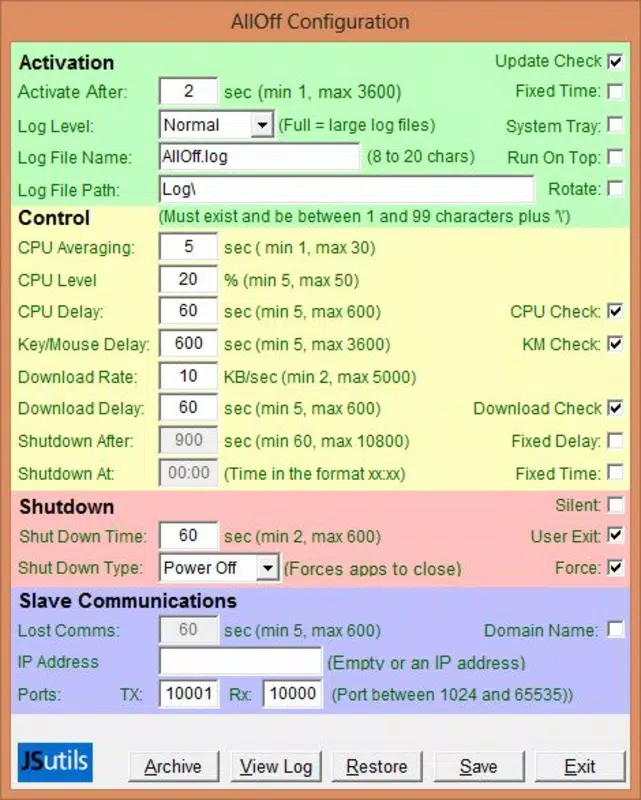
- Custom Shutdown Triggers: Users can define specific inactivity thresholds for CPU usage, mouse movements, keystrokes, and internet activity. This allows precise control over when the system shuts down based on real user behavior.
- Task-Specific Functionality: The app supports continued operation during critical tasks such as backups, file transfers, or software updates. Once these tasks conclude or inactivity is detected, the system shuts down automatically.
- Multi-Computer Control: With the 'AllOff Slave' feature, users can manage multiple computers from a single master device. This enables centralized energy management across a network of machines, ideal for small teams or multi-device setups.
- Background Operation: Once configured, AllOff runs silently in the background without interfering with ongoing tasks. It requires minimal user input after initial setup, making it a hands-off energy-saving solution.
- Environmentally Friendly Design: By reducing idle power consumption, AllOff contributes to lower carbon emissions and supports eco-conscious computing practices. It aligns with growing user interest in green technology and sustainable digital habits.
For example, a remote worker can set AllOff to keep their machine active during a video conference but initiate shutdown after 10 minutes of inactivity. Similarly, a system administrator managing several workstations can use the slave feature to schedule shutdowns across all devices at the end of the day, streamlining operations and conserving energy.
Interface, UX & Performance
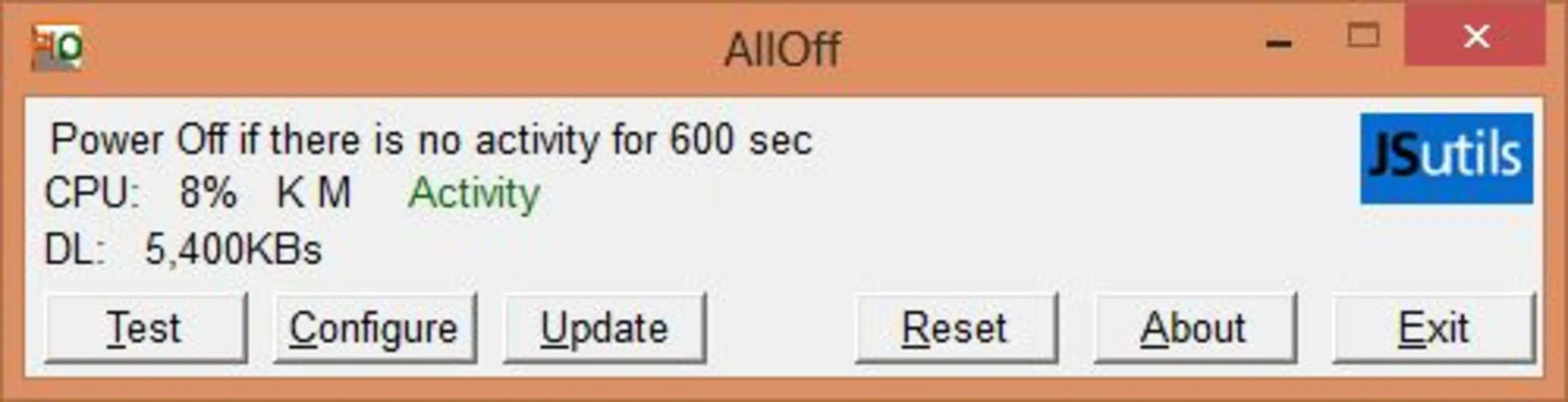
AllOff features a minimalistic interface that prioritizes functionality over visual flair. The layout is straightforward, with clearly labeled settings for each monitoring parameter. Users can adjust thresholds for CPU, mouse, keyboard, and internet activity through simple input fields and dropdown menus, ensuring accessibility for non-technical users.
Navigating the app is intuitive, with a logical flow from setup to activation. The application does not require complex configuration, and its background operation ensures that users are not distracted by constant prompts or notifications. Although the developer did not list formal performance metrics, the app’s file size of 1.5 MB suggests a lightweight footprint, which typically correlates with low system resource usage.
Performance appears consistent across different device categories, as the app is designed to operate efficiently without impacting other processes. Responsiveness is maintained even when monitoring multiple activity types simultaneously. Stability is supported by its long-standing presence in the utility space since 2014, indicating reliable operation over time. The app runs quietly in the system tray, allowing users to focus on their work while energy-saving measures are enforced.
Platform Compatibility & Technical Requirements
AllOff is available exclusively for the Windows platform. The current version is 1.0.1, with a file size of 1.5 MB, indicating a compact and efficient installation. The app is designed to run on standard Windows operating systems, though specific OS requirements were not listed by the developer.
Although the developer did not specify minimum OS requirements, the app’s lightweight nature suggests compatibility with most modern Windows versions, including Windows 7 and later. The absence of complex dependencies or large runtime libraries further supports broad compatibility. Users should ensure their system meets general Windows compatibility standards for running background utilities.
Given the app’s release date of February 12, 2014, and continued availability, it demonstrates long-term support and stability. No updates were mentioned in the provided data, but the app’s enduring presence suggests it remains functional on current systems.
Pros and Cons
Pros
- Lightweight design with minimal system impact
- Flexible inactivity triggers for precise control
- Supports critical tasks without interruption
- Enables centralized management of multiple computers
- Free to download and use
- Environmentally conscious design promotes sustainability
Cons
- Platform limited to Windows only
- No official update history provided
- Developer did not disclose detailed system requirements
- Interface lacks modern visual enhancements
- No mobile or cross-platform availability
FAQ
Is AllOff safe to use on my computer?
AllOff is designed to operate as a background utility with no known security risks. It does not collect user data or install third-party components. As with any system-level tool, users should ensure they download it from trusted sources.
Can I use AllOff on multiple computers?
Yes, AllOff includes a 'Slave' feature that allows one master device to control multiple computers. This enables centralized energy management across a network of machines.
Does AllOff work with Windows 10 and Windows 11?
While the developer did not specify compatibility details, the app’s lightweight design and long-standing presence suggest it is likely compatible with Windows 10 and Windows 11 systems.
Is AllOff free to download and install?
Yes, AllOff is available at no cost. There are no in-app purchases or subscription models associated with the app.
How does AllOff handle ongoing tasks like downloads?
AllOff is designed to monitor activity levels without interrupting important processes. As long as the system detects ongoing CPU, keyboard, or internet activity, the shutdown will be delayed until inactivity is confirmed or the task is complete.
Final Thoughts
AllOff stands out as a focused, reliable utility for users committed to energy efficiency and responsible computing. Its ability to detect inactivity, manage task-based operations, and control multiple systems makes it a valuable tool for both individual users and small teams. Despite its minimal interface and lack of recent updates, the app delivers consistent performance and remains relevant in a world increasingly focused on sustainability.
For anyone looking to reduce idle power consumption without constant supervision, AllOff offers a practical, no-cost solution. Its simplicity, combined with powerful automation features, makes it ideal for environmentally conscious users, remote workers, and system administrators.
Download AllOff now


